Are your online meetings falling flat? It's time to revolutionize your virtual gatherings with R-Link's breakout rooms! These digital powerhouses are the secret sauce for boosting engagement, productivity, and collaboration in your online meetings. Let's dive into 10 innovative ways to leverage R-Link breakout rooms that'll transform your team's virtual experience.
Why R-Link Breakout Rooms Are the Future of Virtual Collaboration
R-Link breakout rooms allow you to split your main meeting into smaller, focused groups effortlessly. This feature enhances participation, fosters deeper discussions, and makes large meetings more manageable. It's like having multiple targeted sessions within one main event! It's time to say goodbye to one-size-fits-all meetings and hello to tailored, engaging experiences.
How to Set Up Breakout Rooms in R-Link Studio
Breakout rooms are available now in every R-Link Studio room. As the host, you can set them up during your session in a few clicks:
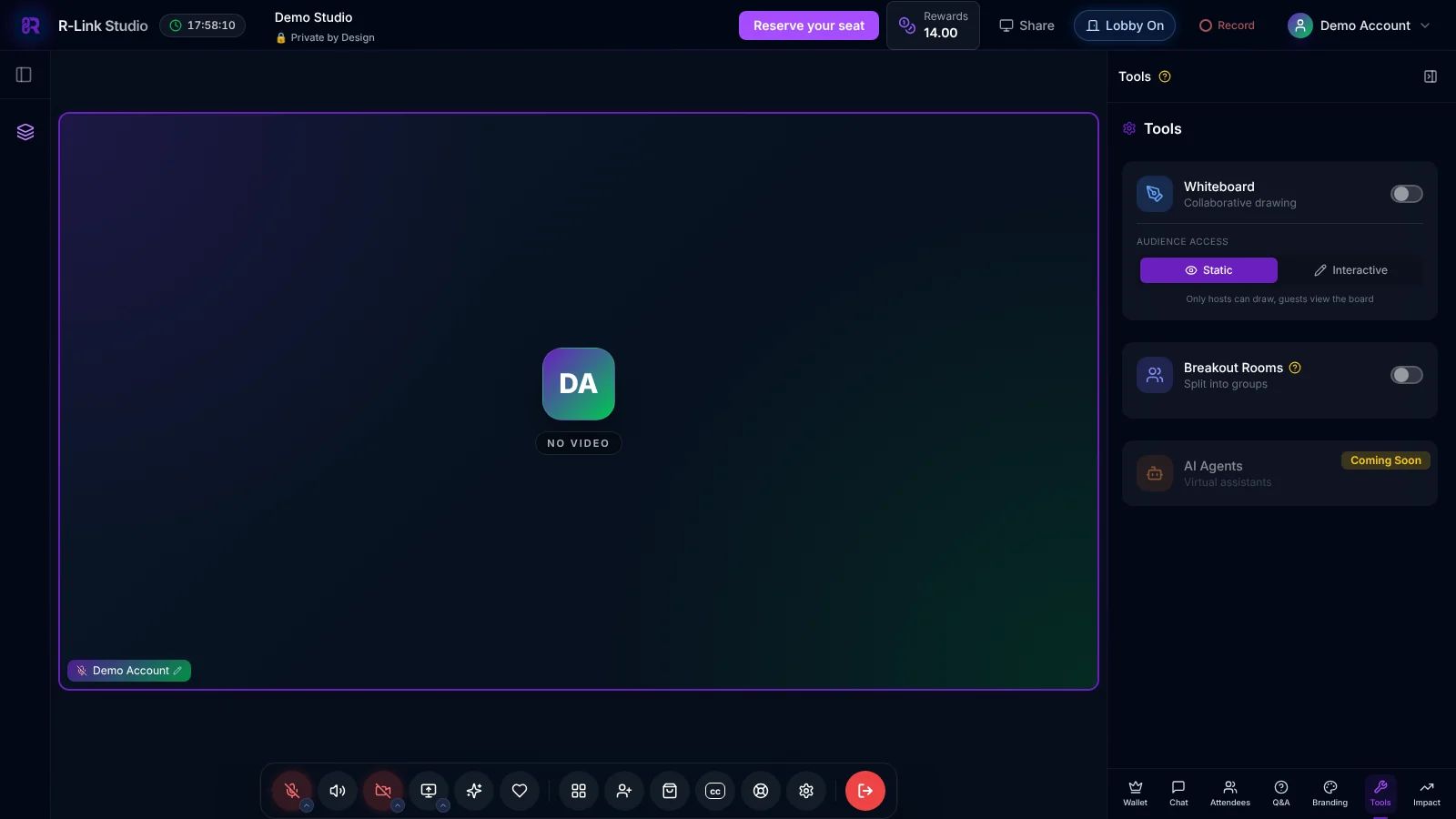
- In your room, open the Tools panel from the right-hand sidebar and switch on Breakout Rooms.
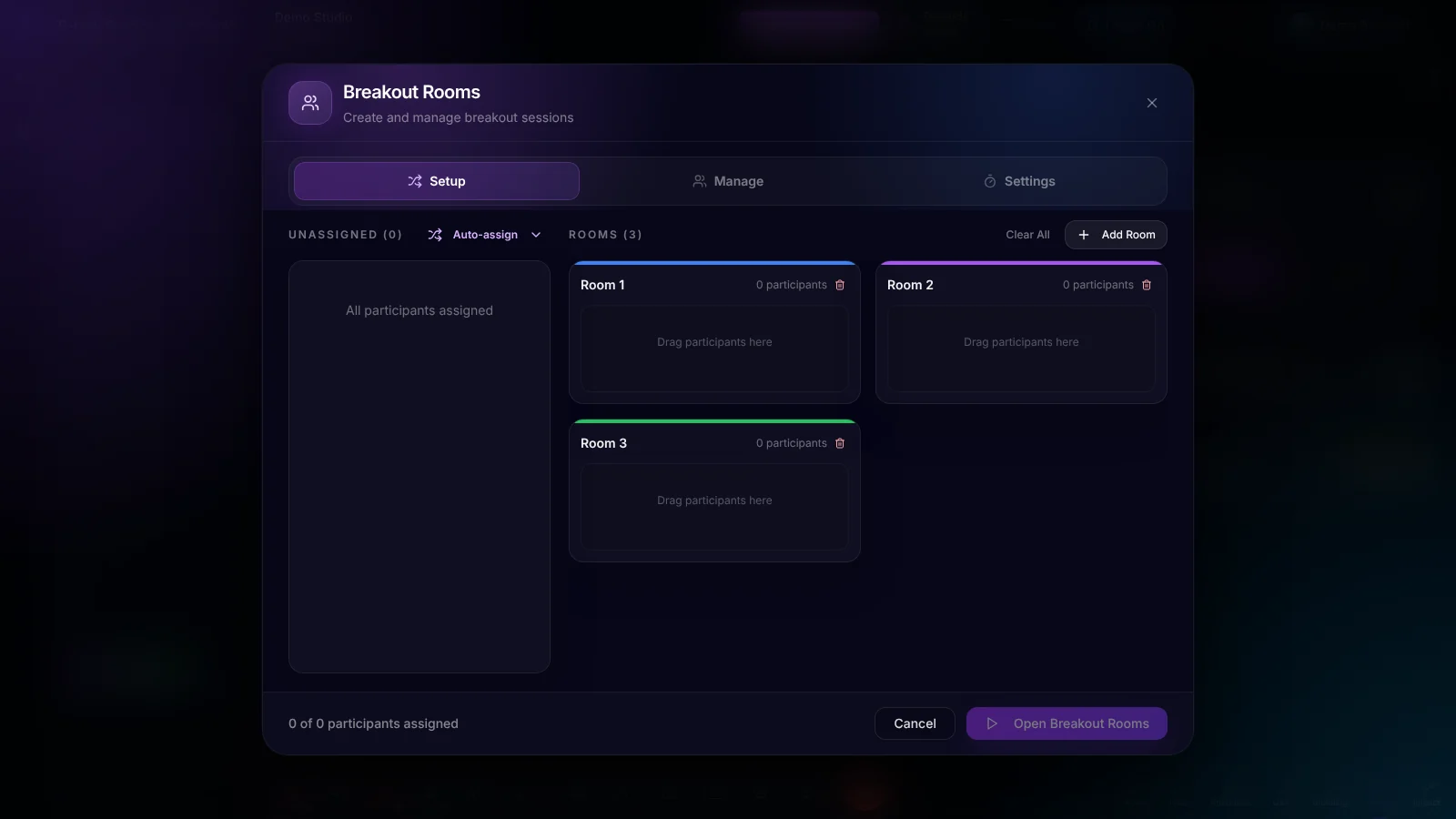
- On the Setup tab, click Add Room to create as many rooms as you need. Drag participants from the Unassigned list into a room, or use Auto-assign to split everyone up for you.
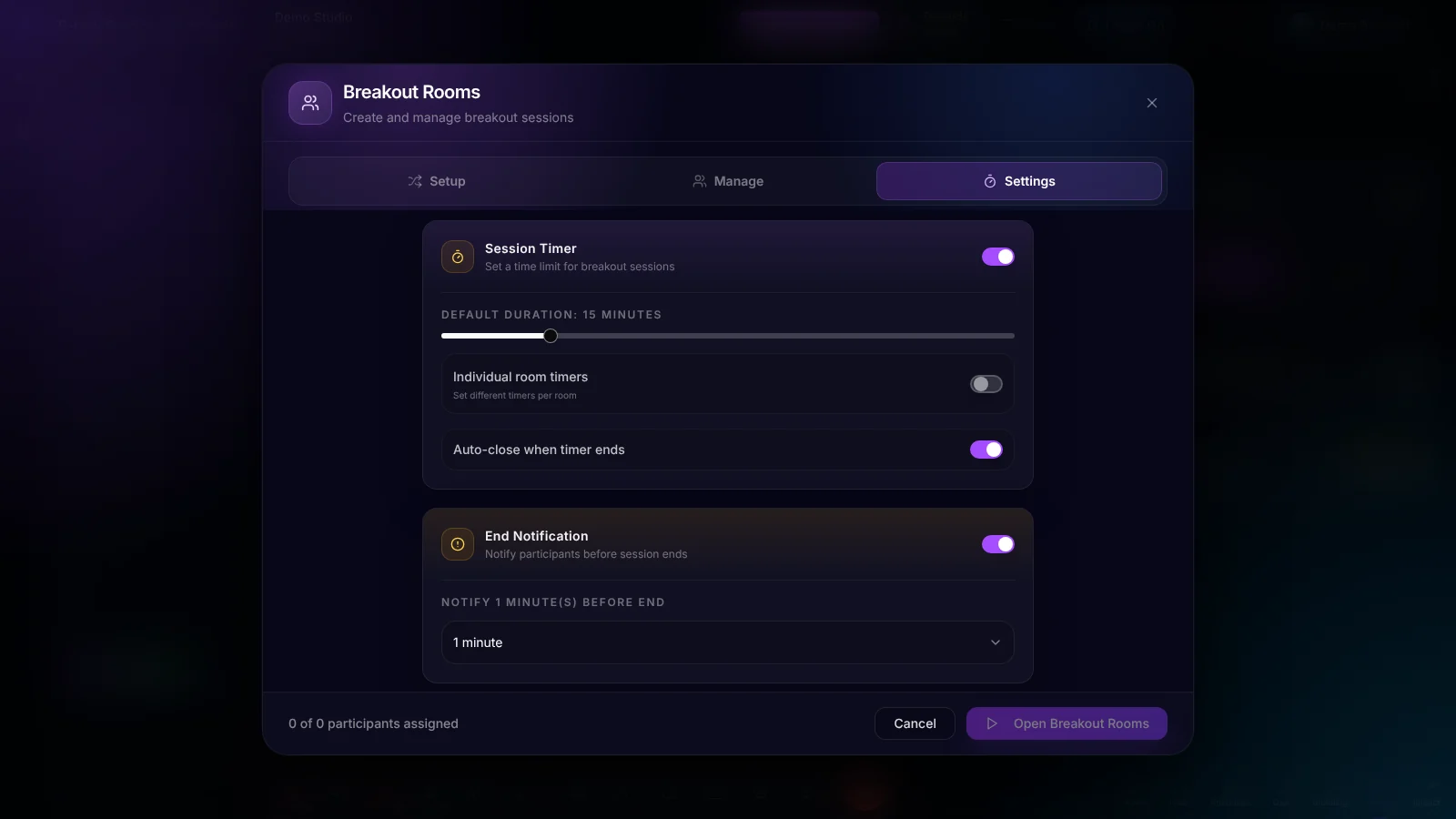
- On the Settings tab, set a Session Timer with a default duration, choose whether rooms close automatically when time runs out, and send an End Notification before the session ends.
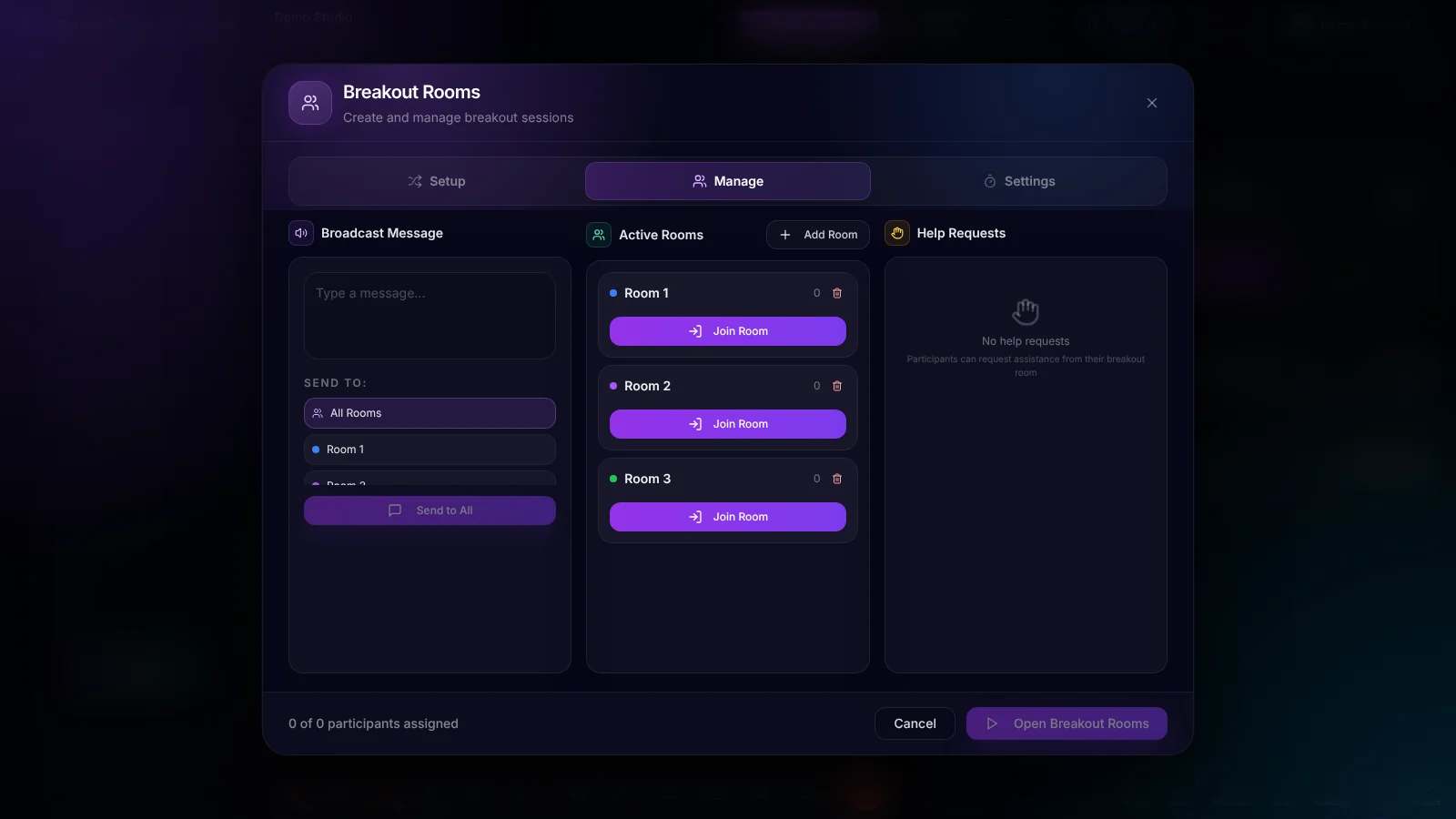
- Click Open Breakout Rooms. From the Manage tab you can broadcast a message to every room or a single room, add rooms, join any room yourself, and see help requests from participants.
10 Breakout Room Strategies That'll Make You a Meeting Maestro
1. Targeted Brainstorming Sessions
Picture this: Business coach, Maria, splits her team into three R-Link breakout rooms—one for social media ideas, another for email campaigns, and a third for influencer partnerships. Forty-five minutes later, they reconvene with a treasure trove of fresh strategies that leave the competition in the dust.
2. Sales Pitch Practice Rooms
Sales superstar Sam pairs up his team in R-Link breakout rooms for role-playing exercises. By the end of the session, rookie rep Rachel has transformed her pitch from "meh" to marvelous and feels ready for her next client conversation.
3. Customized Client Workshops
Consultant Carla uses R-Link breakout rooms to host personalized sessions for each department of her Fortune 500 client. IT, HR, and Finance all get tailored advice and leave with next steps that fit their work.
4. Feedback and Reflection Circles
After launching a new product, CEO Charlie creates small R-Link breakout groups for honest feedback. The candid insights gathered shape the next round of improvements.
5. Virtual Networking Hubs
Event planner Ellie sets up speed-networking breakout rooms at her virtual conference. Attendee Alex meets new people in a few quick rounds, proving that meaningful networking can happen anywhere—even in cyberspace.
6.Skill-Building Workshops
HR hero Helen transforms the annual training day using R-Link breakout rooms. Employees choose their sessions, from "Excel Wizardry" to "Presentation Perfection," so everyone spends time on the skills they actually need.
7. Collaborative Problem-Solving Spaces
When faced with a supply chain crisis, operations guru Oliver splits his global team into regional R-Link breakout rooms. Each group tackles local issues, then shares solutions, creating a robust, flexible strategy that saves the day.
8. Virtual Water Cooler Chats
Remote work champion Rachel introduces "Friday Funday" breakout rooms. Team members bond over shared interests, from pet lovers to book clubs, boosting morale and cross-department collaboration.
9. Multilingual Meeting Support
Global team leader Gina uses language-specific R-Link breakout rooms during international meetings. This approach ensures everyone fully understands the new project requirements, leading to smoother execution and fewer misunderstandings.
10. Wellness and Team Building Activities
Wellness warrior Wendy kicks off monthly all-hands meetings with R-Link breakout rooms for quick meditation or stretching sessions. The result? Increased focus, reduced stress, and a team that's actually excited for meetings.
Pro Tips for Breakout Room Brilliance
- Mix it up! Use Auto-assign to create diverse groups and fresh perspectives.
- Set clear goals for each breakout session. Aimless chatter is so last year.
- Turn on the Session Timer and an end notification to keep breakouts on track.
- Encourage screen sharing in breakouts for maximum collaboration.
- Always reconvene in the main room to share insights. Remember, sharing is caring!
Ready to revolutionize your R-Link meetings? Dive into these breakout room strategies and give your team more ways to take part.
Log in to your R-Link account now and start breaking out like a pro!
Check out our complete guide to setting up your first meeting and become a virtual meeting virtuoso!
Want more meeting magic? Explore our full suite of R-Link features and take your online gatherings to the next level.
Curious about the science behind effective virtual collaboration? Read this fascinating study on digital team dynamics.
Remember, with R-Link's breakout rooms, you're not just hosting a meeting—you're orchestrating a symphony of productivity, engagement, and innovation. Now go forth and break out, you meeting maestro!

We build R-Link Studio, the video platform for meetings, webinars and live streams that sell. Questions about this article? Talk to our team.